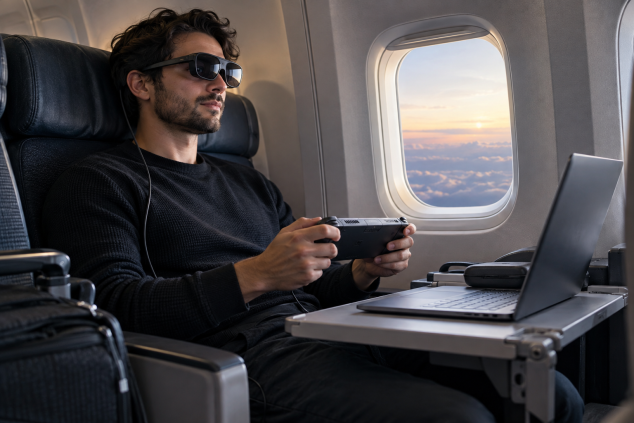
For gaming, movies, and travel, wearable displays can create a surprisingly convincing big-screen experience without adding another physical screen to your bag.
The appeal of AR display glasses is easy for me to understand: carrying a laptop, handheld console, charger, headphones, and a portable monitor starts to feel ridiculous once every cable and stand has found its way into the same backpack. Lightweight display glasses from companies such as XREAL, VITURE, and RayNeo offer a much smaller way to get a large personal screen. These tethered display glasses sit closer to a head-worn external monitor than a fully immersive VR headset. Connect a compatible device, put on the glasses, and its video feed appears as a large virtual display in your field of view. Many models draw power from the source device and rely on USB-C for video, which keeps the glasses themselves relatively light. Current products from the major brands are explicitly designed around gaming, video, laptops, phones, and other external sources. That basic idea makes AR display glasses a believable portable monitor alternative, especially when floor space, tray-table space, or luggage space matters more than having a traditional screen sitting in front of you.
A big reason these glasses can work at all is Micro-OLED. Micro-OLED displays use extremely small OLED panels that can pack a dense image into the compact optical system needed for wearable displays. Like other OLED technology, each pixel produces its own light, which helps create deep blacks and strong contrast. The tiny panel is then enlarged through the glasses' optics so your eyes perceive a much larger image floating ahead of you. XREAL, VITURE, and RayNeo all use Micro-OLED technology in current display-glasses products, although resolution, field of view, brightness, optics, and other specifications vary between models. This is also where the giant-screen marketing deserves some interpretation. A manufacturer might describe its glasses as creating the equivalent of a huge television or cinema screen, but perceived screen size depends on field of view, the simulated viewing distance, how the optics sit in front of your eyes, and your individual fit. I find field of view more useful conceptually than an enormous inch measurement. A virtual image can feel impressively large without feeling exactly like a physical 150-inch television hanging across the room.
Image clarity is where AR display glasses become surprisingly convincing and where I would set realistic expectations for a glasses monitor. Modern models can make a game HUD, streaming interface, subtitles, and ordinary laptop windows look crisp enough that the screen quickly stops feeling like a novelty. For movies, the combination of Micro-OLED contrast and a darkened viewing area is especially well suited to the format. Desktop work asks more from the optics. Fine text near the edges of the image can expose imperfect positioning or optical softness, and a slightly wrong nose-pad position can make part of the screen less comfortable to read. A conventional portable monitor also gives you more freedom to move your eyes and head naturally around a document. I could see myself happily handling email, a browser, or a writing session through virtual monitor glasses. A large spreadsheet, detailed image editing, or a long day of close text work would still push me toward a good physical monitor. The gap has narrowed as manufacturers improve edge clarity and panel resolution, but wearable screens still depend heavily on fit and optical alignment in ways a normal monitor does not. VITURE's current range, for example, includes higher-resolution Micro-OLED models and fit adjustments, while XREAL and RayNeo likewise emphasize optical positioning and display clarity across their current products.
Handheld gaming may be the strongest argument for AR glasses for gaming. A Steam Deck, ROG Ally, Legion Go, or another handheld already gives you the computer and controls, so the missing piece is simply a larger display. Plugging USB-C display glasses into a compatible handheld can turn a relatively small built-in screen into a much larger perceived gaming view while the device stays in your hands. Steam Deck and ROG Ally systems appear on current compatibility documentation from display-glasses manufacturers, though compatibility always needs checking for the specific glasses and source device. I especially like the logic for slower games, RPGs, racing games, emulation, and anything with interfaces that benefit from extra apparent screen area. The same concept works with laptops and compatible smartphones. Nintendo hardware can require additional display hardware depending on the console and glasses, and home consoles generally introduce an HDMI adapter or dock into the chain. XREAL's documentation, for example, describes using a separate control dock for HDMI or DisplayPort sources and for Nintendo Switch connections in certain setups. At that point the wearable display for gaming becomes less minimalist, although it can still occupy far less space than packing an external monitor.
Movies may be an even easier use case because video asks less from the wearer than an eight-hour desktop session. AR glasses for movies can create a private-theatre feeling while you lean back in a hotel bed, sit on a train, or settle into an airplane seat without balancing a tablet on something. Deep OLED blacks help dark scenes, and light-blocking accessories or electronically dimming lenses can reduce how much of the real environment competes with the image. Electrochromic dimming is already part of some VITURE products, while other glasses may use removable shades or different lens treatments. Privacy is another practical advantage that deserves more attention. The main image sits directly in front of the wearer's eyes instead of glowing from an exposed laptop or tablet screen, so the passenger beside you has far less opportunity to read a document or watch your movie. Your connected laptop or handheld may still have a visible screen unless you turn it off or configure the display appropriately, and the glasses themselves do not create an invisible bubble around everything you are doing. Even with that limitation, personal display glasses make much more sense to me for private viewing in a crowded row of seats than a large exposed screen.
Travel is also where the size advantage becomes difficult for a portable monitor to match. A decent portable display needs a protected panel, enough room to stand upright, a cable, and some usable surface in front of you. AR glasses for travel can fit into a protective case closer in size to an oversized sunglasses case, although the complete setup may include several small adapters. I would gladly make that trade for flights, trains, hotel rooms, or waiting areas where pulling out a second physical screen feels awkward. The accessory kit matters almost as much as the glasses. A proper USB-C cable carries video from compatible laptops, phones, tablets, and gaming handhelds. A charging-and-display adapter or suitable USB-C hub can keep a handheld or phone powered while it sends video to the glasses, which becomes important during longer gaming sessions. VITURE, for example, offers adapters specifically designed to pass video to its glasses while providing charging power to the connected source. HDMI-to-USB-C display hardware handles consoles and computers whose usable video output is HDMI. Prescription lens inserts can bring the image into focus for people who need correction beyond whatever adjustment a particular model provides. Interchangeable nose pads help center the optical sweet spot, while a light-blocking cover or dimming lens can make the virtual display easier to see in a bright environment. A compact gamepad and earbuds can complete the setup when the source device needs separate controls or when built-in speakers would bother the person sitting beside you.
Compatibility is the detail I would check before ordering any USB-C display glasses. A USB-C connector does not automatically mean the device can send video. The source generally needs DisplayPort over USB-C, commonly called DisplayPort Alt Mode, or another video-output method supported by the glasses and adapter chain. DisplayPort Alt Mode uses the USB-C connection to carry DisplayPort audio and video signals, which is why two devices with physically identical USB-C ports can behave completely differently when display glasses are plugged in. VESA's DisplayPort specification supports this type of video transport over USB-C, and manufacturers such as XREAL and RayNeo explicitly tell buyers to confirm DP video output before assuming compatibility. That one detail probably prevents more disappointment than any discussion of virtual screen size. Power matters too. Glasses without their own display battery typically draw power from the connected device, so a long gaming session can reduce handheld or phone battery life. Once you add passthrough charging, an HDMI converter, or a manufacturer's spatial-display accessory, the setup can accumulate cables quickly. A physical portable monitor has its own cabling annoyances, though its behaviour is usually easier to understand at a glance.
Comfort ultimately decides whether a wearable monitor becomes part of someone's routine. Brightness has to suit the surroundings, the lenses need to sit at the right height, and pressure from the nose pads or temples can become more noticeable over a long session. Prescription needs also deserve attention because correction options differ between products. Some models provide built-in diopter adjustment, while others use prescription inserts; RayNeo, for example, documents both fit adjustments and prescription-lens support for parts of its range. Perceived focal distance can make the display feel farther away than the tiny physical panel inside the glasses, yet wearing a screen for hours is still a different experience from occasionally glancing at a desk monitor. Some people may also find moving content or head-relative displays uncomfortable, so breaks and sensible brightness settings remain worthwhile. I would be much more confident choosing display glasses for a two-hour film, an evening gaming session, or several bursts of travel work than committing to an entire workday inside them. That distinction largely answers the AR glasses vs monitor question for me. AR display glasses can genuinely replace a portable monitor when portability, privacy, and a large personal viewing area are the priorities. A physical monitor still makes more practical sense for prolonged desktop work, precision-heavy tasks, easy sharing with another person, or situations where wearing something on your face becomes tiring. As a travel screen and gaming companion, though, the wearable monitor concept has reached the point where I would seriously consider leaving the extra panel at home.
Pros:
- Much easier to pack than a portable monitor
- Creates a large perceived screen for gaming and movies
- Micro-OLED panels can deliver strong contrast and deep blacks
- Offers better privacy than an exposed laptop or tablet screen
- Works especially well with compatible handheld gaming devices
- Useful on planes, trains, and in hotel rooms
- Can be comfortable for movies or shorter gaming sessions
- Accessories can add charging, HDMI support, prescription correction, and better light blocking
Cons:
- USB-C does not always mean video output is supported
- Some devices require extra adapters, hubs, or docks
- Fine text and detailed desktop work can be less comfortable than on a physical monitor
- Fit and optical alignment can affect sharpness
- Nose and temple pressure may become noticeable during long sessions
- Power draw can reduce handheld or phone battery life
- Extended work sessions may feel tiring
- Sharing the screen with another person is difficult
Bottom Line:
AR display glasses make the most sense as a portable monitor replacement for gaming, movies, and travel. For long workdays, spreadsheets, detailed visual tasks, or shared viewing, I would still prefer a physical monitor.
Tags:
AR display glasses, AR glasses for gaming, wearable monitor, glasses monitor, AR glasses vs monitor, display glasses, Micro-OLED display glasses, wearable screen, portable monitor alternative, AR glasses for movies, AR glasses for travel, AR glasses