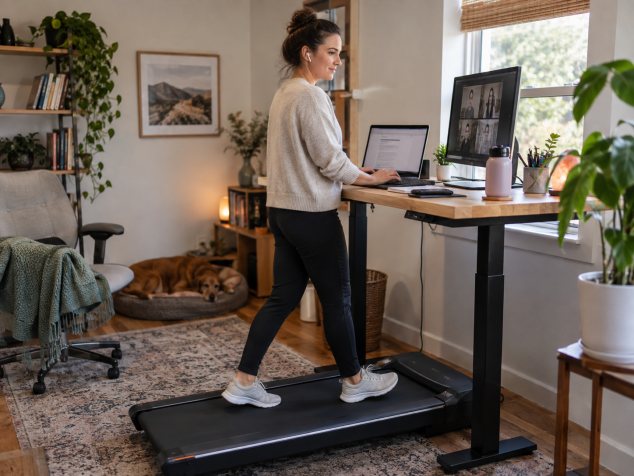
A walking pad can make a work-from-home day more active, but speed, posture, and task choice determine whether it helps productivity or becomes a distraction.
You can use a walking pad while working and still get useful work done, although I’ve found that success depends heavily on what I’m doing and how slowly I’m willing to walk. My first mistake was treating the walking pad like a miniature treadmill workout. Once I stopped caring about pace and started treating it as background movement, the whole setup made more sense. Calls, inbox cleanup, reading, light research and routine administrative work feel surprisingly natural while walking. Precision-heavy work is a different story. Research on active workstations reflects some of that experience: a 2024 randomized clinical trial found that reasoning, memory and concentration generally held up well at active workstations, while typing speed dropped somewhat. Reviews of treadmill-desk research have also found that fine motor tasks such as typing and mouse work can suffer even when broader cognitive performance remains fairly stable.
A good walking pad speed for working is usually much slower than a normal exercise walk. For me, somewhere around 1 to 1.5 mph is the useful zone for actual computer work, and I often start near the bottom of that range when I know I’ll be typing. That is a practical starting point, not a magic number. In the 2024 Mayo Clinic-led study, participants were advised to walk at a comfortable 1 to 2 mph and ultimately averaged about 1.48 mph. Older research also suggests that walking speed can influence typing performance, which is another reason I would resist cranking up the pace just because the walking pad can go faster. I know I’m moving too quickly when my fingers start landing harder on the keyboard, I have to visually chase text across the screen, or my stride starts feeling oddly deliberate. At that point, shaving half a mile per hour off the speed usually helps more than trying to “get used to it.”
The task itself matters just as much as speed. I like a walking desk for video meetings where I’m mostly listening, going through email, reviewing documents, reading articles and doing low-stakes research. I can also handle basic planning or other work that doesn’t require constant mouse precision. Detailed editing is where I usually get off. The same goes for complicated spreadsheets, layout or design work, and writing that requires sustained concentration on sentence-level decisions. Mouse dragging feels particularly annoying when your whole body is moving underneath your hand, and research has repeatedly identified typing, clicking and other fine motor tasks as areas where treadmill workstations can reduce performance. There are days when a walking pad seems to help me stay engaged through a long call, yet I would never force myself to keep walking through work that clearly becomes slower or sloppier because of it.
The physical setup determines whether a walking pad desk feels comfortable after ten minutes or starts turning you into a hunched-over mess. I center the walking pad directly in front of the monitor instead of offsetting it to squeeze around furniture. The desk goes high enough that my shoulders can stay relaxed and my elbows sit comfortably near keyboard height, with the keyboard and mouse close enough that I never have to reach forward. OSHA's workstation guidance recommends keeping the keyboard around elbow height with relaxed shoulders and straight wrists, while the monitor should sit directly ahead, generally 20 to 40 inches from the eyes, with the top of the screen at or slightly below eye level. A sturdy desk matters too. If every footfall makes the monitor wobble, focusing becomes irritating fast. I also avoid resting my forearms heavily on the desk. Once I start using the desktop to hold myself up, my posture has already gone downhill.
Walking form can quietly deteriorate when the screen gets most of your attention. I catch myself shortening my stride, creeping too close to the front of the pad or leaning forward when I get absorbed in something. Those are my cues to slow down. The goal is a natural, relaxed stride with an upright torso, comfortable arm position and enough room to place each foot normally. I would rather walk slowly with decent form than accumulate more steps while shuffling underneath my desk. Footwear also makes a bigger difference during long sessions than I expected. I prefer lightweight walking or running shoes with a secure fit and enough cushioning to remain comfortable through repeated short sessions. Loose slippers feel unstable to me, while barefoot walking becomes uncomfortable once the minutes start adding up. Whatever you wear, recurring hot spots, unusual foot fatigue or changes in your stride deserve attention instead of being treated as something you have to push through.
For a beginner, I would build walking pad use into the day in small blocks instead of attempting a two-hour walking session on Monday morning. My version would start with 10 to 15 minutes during email or an easy meeting, followed later by another short session during reading or administrative work. I’d spend the rest of the day alternating normal seated work with occasional standing. After several comfortable days, those walking blocks can grow toward 20 or 30 minutes, perhaps reaching 45 to 60 minutes of walking across the whole workday instead of in one continuous stretch. That gradual approach gives you time to figure out your desk height, footwear, preferred pace and which tasks actually cooperate with movement. The 2024 active-workstation trial gave participants a habituation period before testing, and performance improved after the first day, which also suggests there can be an adjustment period. When I want an actual brisk walk, I stop typing, increase the speed and spend ten or fifteen minutes simply walking. Trying to turn every work session into exercise tends to make both activities worse.
So, is an under desk treadmill worth buying for someone who works from home? I think it can be, especially if your day contains meetings, reading, routine communication and other stretches of work where constant fine motor precision is unnecessary. It gives those otherwise sedentary parts of my schedule somewhere productive to go, and I like being able to finish a long call with a decent amount of walking already behind me. I would be less enthusiastic for someone whose entire day revolves around detailed graphic work, complex spreadsheets or intensive editing, because those are exactly the times I find myself wanting a completely stable workstation. The walking pad earns its space when I let different parts of the workday have different modes: sitting when concentration needs stillness, slow walking when the task allows it, and a dedicated faster walk when I actually want exercise. That flexibility is what finally made a walking pad while working feel useful instead of distracting.
Pros:
- Adds more movement to a sedentary workday without requiring a separate workout.
- Works well for meetings, email, reading, light research, and routine admin tasks.
- Slow walking can feel natural once the desk and monitor are positioned properly.
- Short sessions are easy to fit around seated work.
- Can be especially useful for people who work from home and spend long hours at a desk.
Cons:
- Precise typing, detailed editing, spreadsheets, and design work can become harder.
- Walking too quickly can lead to shorter strides, leaning, and awkward posture.
- A poor desk setup can cause discomfort in the neck, shoulders, wrists, or back.
- Longer sessions may cause foot fatigue, especially with unsupportive footwear.
- Some people may find the movement distracting during mentally demanding work.
Bottom Line:
A walking pad is worth it if you use it selectively. I’d recommend slow walking for easier work tasks and short sessions throughout the day, while saving demanding writing, editing, and precision work for a stable seated or standing setup.
Tags:
walking pad while working, walking pad desk, under desk treadmill, under desk treadmill while working, best walking pad speed for working, how fast to walk while working, is a walking pad worth it, walking pad for work at home, how to use a walking pad