microSD Express vs microSD: Compare transfer speeds, Nintendo Switch 2 compatibility, card readers, and whether faster storage is worth buying.
I've always found it slightly ridiculous how much storage technology can fit onto something smaller than a fingernail. Now there's an even better example: two microSD cards can look practically identical while operating at dramatically different speeds. That's what makes microSD Express vs microSD such an interesting comparison. One uses the familiar storage technology we've relied on for years, while the other borrows technology from high-performance solid-state drives. The difference becomes especially interesting when you start thinking about handheld gaming devices, growing digital game libraries, and the amount of data modern electronics need to move around. Nintendo Switch 2 has given microSD Express some much-deserved attention, although I think the technology itself is the more interesting story. There's something genuinely appealing about getting SSD-like performance from a memory card small enough to lose between the couch cushions.
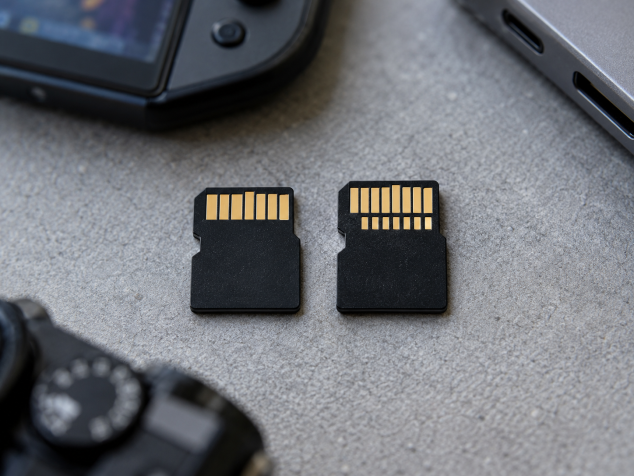
So, what is microSD Express, and how does it work? Conventional microSD cards generally communicate with devices through an SD interface such as UHS-I, which handles the transfer of information between the card and its host. MicroSD Express introduces PCI Express (PCIe) connectivity and the NVMe protocol, technologies commonly associated with modern SSDs. PCIe provides a much faster communication pathway, while NVMe is designed to handle storage commands efficiently, including requests for data scattered across the drive. This matters because loading a game or running software often involves accessing numerous small files rather than reading one enormous file from beginning to end. MicroSD Express effectively brings removable NVMe storage into the established microSD form factor, complete with additional electrical contacts to support its faster interface. I particularly like that the technology makes better use of an existing physical format. The same tiny footprint can accommodate a considerably more capable storage system, provided the device has the hardware to support it.
The microSD Express speed advantage becomes obvious when you look at the numbers. A conventional UHS-I microSD interface has a theoretical maximum transfer rate of 104 MB/s, while the PCIe 3.0 x1 interface used by earlier microSD Express implementations supports up to 985 MB/s. The newer PCIe 4.0 x1 microSD Express specification can theoretically reach 1,970 MB/s. Those figures describe interface capabilities, so actual card performance will depend on the flash memory, controller, and host device. For a realistic reference, Samsung's P9 Express advertises sequential reads of up to 800 MB/s, while SanDisk has microSD Express models rated for up to 880 MB/s. Write speeds can be lower, particularly during sustained transfers as the card heats up or its fast write cache fills. Even with those limitations, the potential difference is considerable. Copying a large collection of video files could take substantially less time, and compatible games may benefit from quicker loading and asset streaming. The important distinction in microSD Express vs UHS-I is that advertised peak speeds represent ideal conditions. A faster card cannot eliminate delays caused by the game's software, processing demands, or other hardware limitations.
Nintendo Switch 2 is probably the clearest example of why this technology matters to everyday consumers. Nintendo requires microSD Express cards for expanding usable game storage on Switch 2, meaning the conventional microSD cards that worked perfectly well with the original Nintendo Switch cannot store playable downloads on the newer console. Nintendo allows older cards to be used for importing existing screenshots and captured videos, which is helpful when upgrading, although it doesn't solve the game storage problem. MicroSD Express supports the faster storage access Nintendo wants for games designed around its newer hardware. The console supports compliant microSD Express cards with capacities up to 2 TB, allowing players to expand their digital libraries without constantly deleting downloads. One detail worth remembering is that game save data stays in the console's internal memory, even when the downloaded game itself is stored on a microSD Express card. Personally, I think this requirement makes sense for maintaining consistent game storage performance, although replacing a perfectly functional high-capacity card from an older Switch is understandably frustrating.
MicroSD Express compatibility is where I would pay the most attention before spending money. MicroSD Express cards retain a legacy UHS-I interface, allowing them to operate in many older microSD devices, assuming the device supports the card's capacity and file system. However, microSD Express backward compatibility generally means falling back to conventional UHS-I performance. Even a device with a UHS-II slot cannot automatically access Express speeds because UHS-II and PCIe use different communication technologies. The original Nintendo Switch, for example, can use a microSD Express card at conventional microSD speeds. The reverse compatibility question is equally important: a device designed specifically around Express storage may reject conventional cards for certain functions, as Switch 2 does for game storage. Shoppers should look for the microSD Express or microSD EX logo and verify that the device explicitly supports the format. Don't confuse microSD Express with full-size SD Express, either. Both use PCIe and NVMe technology, although their physical sizes differ. A simple microSD-to-SD adapter doesn't automatically provide Express functionality, and a faster-looking card label is hardly a guarantee of compatibility.
There's also an accessory consideration that I suspect will catch quite a few people out: a microSD Express card reader needs to support the Express interface to deliver those higher transfer speeds. Connecting an expensive card to an ordinary USB-C microSD reader can leave you operating at legacy speeds, which rather defeats the purpose. A dedicated microSD Express-compatible USB-C reader is useful when transferring large game files or media collections between the card and a computer. Lexar, for example, offers a microSDXC Express reader with a USB 3.2 Gen 2 interface, while SanDisk has an SD Express dual-card reader supporting both full-size SD Express and microSD Express. These are examples of readers that explicitly support the newer standard. The connection matters too: USB 3.2 Gen 2 provides a nominal 10 Gbps link, although protocol overhead reduces usable transfer rates. The computer's port and any detachable USB-C cable must also support sufficient data bandwidth. USB-C describes the connector shape, so seeing that familiar oval plug tells you surprisingly little about speed. I'd also consider a protective memory card case with individual slots, especially when carrying several expensive cards. For the cards themselves, I'd prioritize verified capacity, manufacturer warranty coverage, and published read and write specifications over impressive packaging. Sustained performance and thermal behaviour deserve attention when moving large files regularly.
That leaves the practical buying question: is microSD Express worth it? For someone with a Nintendo Switch 2 and an expanding collection of downloadable games, the answer is straightforward because it's the supported format for storage expansion. It can also make sense for other compatible handheld gaming systems or portable devices that need fast access to large amounts of data. People regularly moving high-resolution footage between compatible hardware and their computers could appreciate the shorter transfer times, assuming both ends of the workflow support Express speeds. Everyday users with conventional cameras, older smartphones, or basic electronics have much less reason to upgrade. A good UHS-I microSD card remains entirely adequate for many photo storage and media playback tasks, while devices with UHS-II support may have their own faster conventional card options. There's also the question of capacity versus speed. For a device limited to UHS-I, I'd generally rather buy a reliable, higher-capacity conventional card than pay extra for Express performance the device can't access.
What makes microSD Express interesting to me is how convincingly it challenges the idea that removable memory cards have to remain relatively slow. The combination of PCIe and NVMe gives this familiar little storage format capabilities that would have sounded excessive for a microSD card a few years ago. Still, I wouldn't start replacing every conventional memory card I own. The smartest purchase begins with checking what the device actually supports, followed by choosing enough capacity for the files or games you're likely to keep. If Express compatibility is available and faster storage can improve your everyday experience, the additional expense becomes much easier to justify. Otherwise, a dependable conventional microSD card still does its job remarkably well. MicroSD Express absolutely deserves attention as an interesting consumer electronics advancement, particularly as portable gaming demands more capable storage. I just love the strange reality that something capable of carrying an entire game library can still disappear under a single loose receipt on my desk.
Pros:
Much faster transfer speeds: Offers significantly higher read speeds than conventional UHS-I microSD cards, making large file transfers quicker.
SSD-like technology: Uses PCIe and NVMe to deliver faster storage access in a tiny, familiar memory card format.
Ideal for Nintendo Switch 2: Supports the console's expandable game storage requirements and demanding gaming workloads.
Faster game loading potential: Can improve loading times and asset streaming when supported by compatible hardware.
Backward compatibility: Can operate in many older microSD devices at conventional UHS-I speeds.
Compact and portable: Maintains the familiar microSD size while offering substantially greater performance potential.
Useful for large media files: Can reduce transfer times when moving high-resolution videos and other large files with compatible equipment.
Cons:
Higher cost: Generally more expensive than conventional microSD cards with similar storage capacities.
Limited device compatibility: Requires hardware specifically designed to support microSD Express for maximum performance.
Additional accessories may be necessary: Achieving faster computer transfers requires a compatible microSD Express card reader and suitable USB connectivity.
Older devices limit speeds: Backward compatibility typically restricts performance to conventional UHS-I levels.
Actual speeds vary: Advertised maximum speeds depend on card specifications, device capabilities, and operating conditions.
Unnecessary for basic storage: Many cameras, smartphones, and older electronics cannot benefit from the additional speed.
Bottom Line:
MicroSD Express is one of the more interesting improvements to removable storage in years, especially for handheld gaming. I love the idea of getting SSD-like performance from something as small and convenient as a traditional microSD card. For Nintendo Switch 2 owners, it's an essential consideration when expanding game storage. For everyone else, the value depends heavily on device compatibility. I'd happily pay more for microSD Express when the hardware can take advantage of its speed, although a reliable conventional microSD card remains the smarter purchase for everyday storage in older devices.
Tags:
microSD Express vs microSD, microSD Express, microSD Express speed, microSD Express compatibility, Nintendo Switch 2 microSD Express, microSD Express vs UHS-I, microSD Express card reader, PCIe NVMe storage, SD Express vs SD card