A powerful portable Windows gaming device that doubles as a serious remote work setup and creative workstation on the go.
I picked up the Lenovo Legion Go 2 expecting a powerful handheld gaming PC. What surprised me is how quickly it became the device I reach for when I need to get real work done outside my office. It lives in my bag as a portable Windows gaming device, yet most days it functions as my remote work setup and creative workstation on the go.
Under the hood, the Lenovo Legion Go 2 runs on an AMD Ryzen Z-series processor built for high-efficiency performance in compact systems. Mine is configured with 16GB of LPDDR5X RAM and a 1TB NVMe SSD, which has been more than enough for multitasking across Chrome tabs, Notion, Lightroom, and light Premiere Pro projects. It ships with Windows 11, which means no weird workarounds for productivity apps. The high refresh rate display makes a noticeable difference even outside gaming. Scrolling through documents at 144Hz feels smooth and responsive, and the 8.8-inch QHD+ panel gives me enough screen real estate to work comfortably when I am away from a larger monitor. Thermals have been steady during extended work sessions, and fan noise stays controlled unless I am pushing heavier rendering tasks.
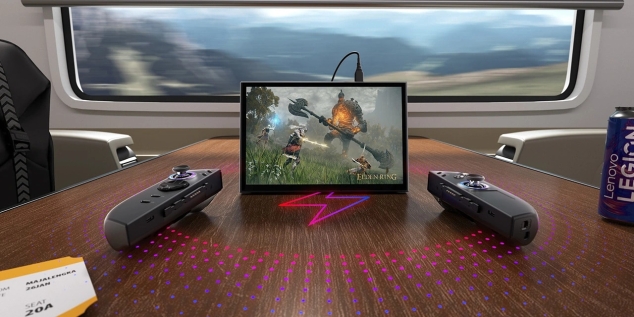
The detachable controllers are one of the most overlooked features for productivity. When attached, the device feels like a traditional handheld gaming PC. When removed, it transforms into a compact tablet-style computer with a built-in kickstand. I often detach the controllers, prop it up on a café table, and pair it with a portable keyboard and Bluetooth mouse. That flexibility turns it into a mobile productivity device that adapts to whatever surface I am working on. The build quality feels solid, with a sturdy chassis and well-balanced weight distribution that avoids hand fatigue during longer sessions.
For remote work, this device has replaced my lightweight laptop on short trips. I connect through USB-C docking to a monitor at home, and it instantly behaves like a desktop. Email, project management dashboards, content writing, cloud-based analytics tools, and even light spreadsheet modeling run without friction. Because it is a full Windows environment, I can install the same desktop software I use in my office. It feels like a portable workstation alternative that does not force compromises in my workflow.
Creatively, it has become my editing companion. I use it for photo sorting and color adjustments in Lightroom, quick thumbnail design in Photoshop, and rough video cuts before exporting final versions on a more powerful desktop. The AMD Ryzen Z-series processor handles 1080p timelines without stuttering, and the fast SSD keeps file transfers smooth when working off an external drive. I also use cloud workflows extensively, syncing projects through Google Drive and Adobe Creative Cloud, which makes this a legitimate creative workstation on the go rather than a novelty device.
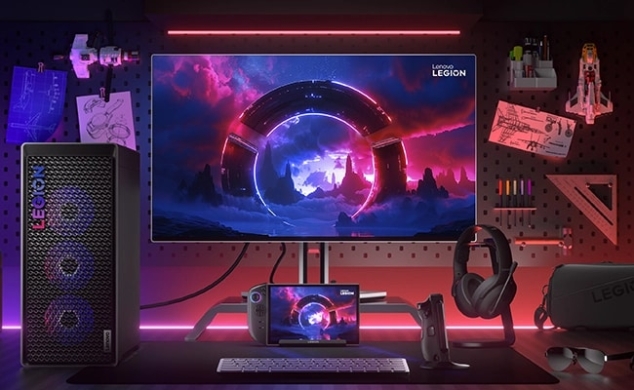
Accessories are where the Lenovo Legion Go 2 really scales up. I run it through a USB-C docking station that connects to power, Ethernet, and a 27-inch monitor when I am home. In my travel kit, I carry a foldable mechanical keyboard, a compact Bluetooth mouse, a slim protective case, and a 2TB external SSD for media storage. On longer trips, I sometimes add a portable monitor to create a dual-screen setup in hotel rooms. That modular ecosystem turns a handheld into a serious remote work setup. I have even experimented with a stylus for quick markups on PDFs and design drafts, which adds another layer of utility.
Battery life depends on workload. For writing and browser-based tasks, I get several solid hours before needing a charge. Heavier creative work or gaming drains it faster, which is expected from a high-performance portable Windows gaming device. The upside is fast charging over USB-C, so I can top it up with the same charger I use for my phone and other gear. For travel days, the compact size and integrated controls mean fewer separate devices in my backpack.
What keeps the Lenovo Legion Go 2 in my daily rotation is how well it fits into a hybrid work lifestyle. I can answer emails on a train, review edits in a café, dock it at home for deep work, and unwind with a game at night without switching machines. It does not feel like a short-lived tech trend. It feels like a glimpse at where portable computing is heading. As a handheld gaming PC it is impressive, yet as a mobile productivity device and creative workstation on the go, it has quietly become one of the most practical tools I own.
Pros:
- Powerful AMD Ryzen Z-series processor that handles multitasking, creative apps, and modern games with ease
- Full Windows 11 environment for true desktop-class productivity
- High refresh rate display that feels smooth for both work and play
- Detachable controllers that add flexibility for tabletop and docked setups
- USB-C docking support for monitor, Ethernet, and peripherals
- Compact size makes it ideal for travel and hybrid work
- Fast NVMe storage with upgrade potential depending on configuration
- Strong build quality with integrated kickstand
Cons:
- Battery life drops quickly under heavy creative workloads or gaming
- Larger and heavier than a typical tablet
- Fan noise becomes noticeable during demanding tasks
- Small screen can feel cramped without an external monitor for long sessions
- Premium pricing compared to basic ultrabooks
Bottom Line:
The Lenovo Legion Go 2 stands out as more than a handheld gaming PC. It functions as a legitimate portable workstation alternative for remote work, writing, editing, and light production tasks. If you want a single mobile productivity device that can shift between serious work and high-performance gaming, this is a smart long-term investment rather than a short-lived novelty.
Tags:
Lenovo Legion Go 2, handheld gaming PC, portable Windows gaming device, remote work setup, mobile productivity device, creative workstation on the go, portable workstation alternative, hybrid work technology, travel productivity tech, compact Windows PC